

The automation market has exploded with options. On one side, no-code platforms like Zapier, Make, and Power Automate promise instant automation without writing a single line of code. On the other, Python advocates claim superior flexibility and zero subscription costs. Both sides have valid points — and both conveniently ignore their weaknesses.
This comparison cuts through the marketing. After examining real-world usage patterns, cost structures, and capability boundaries, the answer becomes clear: the best choice depends entirely on what you’re automating, how often it changes, and whether you’re willing to invest time upfront to save money long-term.
Understanding the Two Approaches
No-code automation tools work through visual interfaces. You connect apps by dragging blocks, selecting triggers, and mapping data fields. The platform handles the technical complexity — authentication, error handling, scheduling — behind a friendly dashboard.
Python automation requires writing scripts. You specify exactly what happens, when it happens, and how to handle exceptions. The learning curve is steeper, but you control every aspect of the process.
Neither approach is inherently superior. They optimize for different constraints: no-code optimizes for speed to first automation; Python optimizes for long-term flexibility and cost efficiency.
The Real Cost Comparison
No-code pricing follows a familiar pattern: free tiers with strict limitations, then escalating monthly fees based on usage. Here’s what popular platforms actually cost for moderate business use:
| Platform | Free Tier | Business Tier | Key Limitation |
| Zapier | 100 tasks/month | $69-$149/month | Per-task pricing adds up |
| Make | 1,000 ops/month | $16-$65/month | Complex workflows consume ops fast |
| Power Automate | Limited flows | $15-$40/user/month | Premium connectors cost extra |
| Python | Unlimited | $0 | Requires learning investment |
The cost difference compounds over time. A workflow running 1,000 times monthly might cost $50-100 on no-code platforms. The same workflow in Python costs nothing to run — you’ve already paid with learning time.
For a single simple automation, no-code wins economically. For ten automations running continuously, Python’s zero marginal cost becomes significant. For fifty automations across a team, no-code subscriptions can exceed $1,000 monthly while Python remains free.
Where No-Code Tools Excel
No-code platforms genuinely outperform Python in specific scenarios:
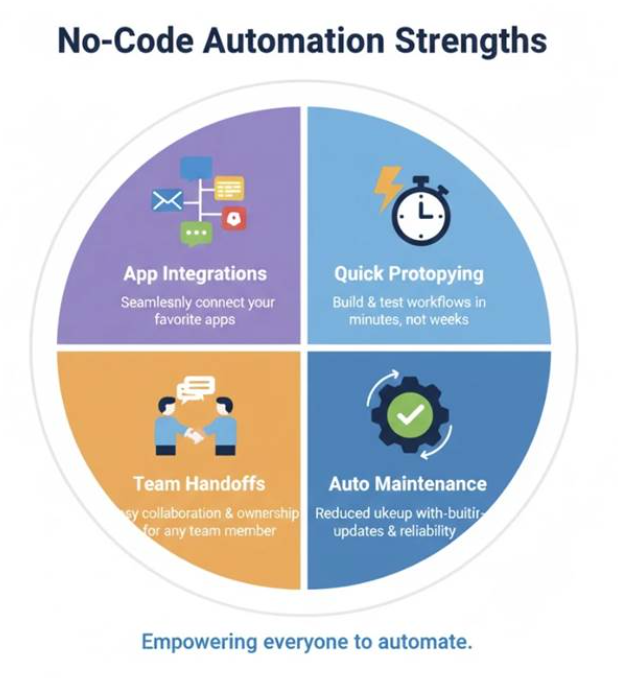
App-to-App Integrations
Connecting Salesforce to Slack to Google Sheets? No-code tools have pre-built connectors that handle authentication, rate limits, and API changes automatically. Building the same integration in Python requires understanding each platform’s API documentation — hours of work for something no-code accomplishes in minutes.
Quick Prototyping
When you need to test whether an automation idea works before investing significant time, no-code delivers faster feedback. You can build, test, and discard a workflow in an afternoon. The same Python script might take days for someone still learning.
Team Handoffs
Visual workflows are easier to document and transfer. A colleague can understand a Zapier workflow by looking at it. A Python script requires reading code — a skill not everyone possesses.
Maintenance Windows
When APIs change, no-code platforms often update their connectors automatically. Your workflows keep running while the platform handles compatibility. Python scripts may break until you manually update them.
Where Python Automation Wins
Python capabilities extend far beyond what no-code tools can match:
Complex Logic and Conditions
No-code tools handle simple if-then logic well. But when you need nested conditions, loops within loops, or dynamic decision trees based on calculated values, visual builders become unwieldy. Python expresses complex logic naturally.
Data Transformation
Cleaning messy data, restructuring formats, and performing calculations across thousands of rows requires programming. No-code tools offer basic transformations; Python with pandas handles virtually any data manipulation imaginable.
Local File Operations
Organizing files on your computer, batch-renaming documents, extracting text from PDFs, processing images — these tasks happen on your machine, not in the cloud. No-code platforms can’t access your local filesystem. Python scripts run wherever you need them.
Custom Scraping and Extraction
Gathering data from websites that don’t offer APIs requires parsing HTML, handling pagination, and managing sessions. Python libraries like BeautifulSoup and Selenium provide fine-grained control that no-code web scrapers can’t match.
Unlimited Scale
Process a million rows? Run a thousand iterations? No-code platforms charge by volume. Python processes whatever your computer’s memory can handle — for free.
Full Customization
When requirements don’t fit pre-built templates, Python lets you build exactly what you need. No-code tools constrain you to their feature set and supported integrations.
The Hidden Factor: Skill Transferability
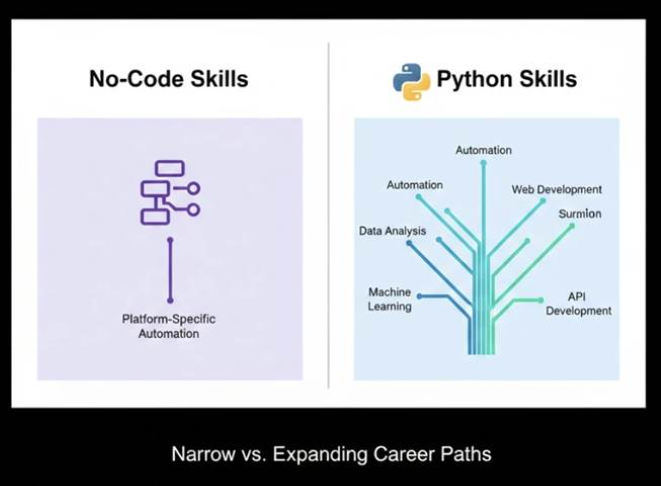
Learning Zapier teaches you Zapier. If you switch to Make, you relearn the interface. If the platform shuts down or changes pricing, your expertise partially resets.
Learning Python teaches you programming fundamentals that transfer everywhere. The syntax you learn for automation applies to data analysis, web development, machine learning, and countless other domains. You’re building a skill with compounding returns rather than platform-specific knowledge.
This doesn’t make no-code worthless — quick wins have real value. But it does affect the long-term calculation, especially for professionals considering career development alongside immediate task completion.
Decision Framework: Which Should You Choose?
Use this framework to guide your decision:
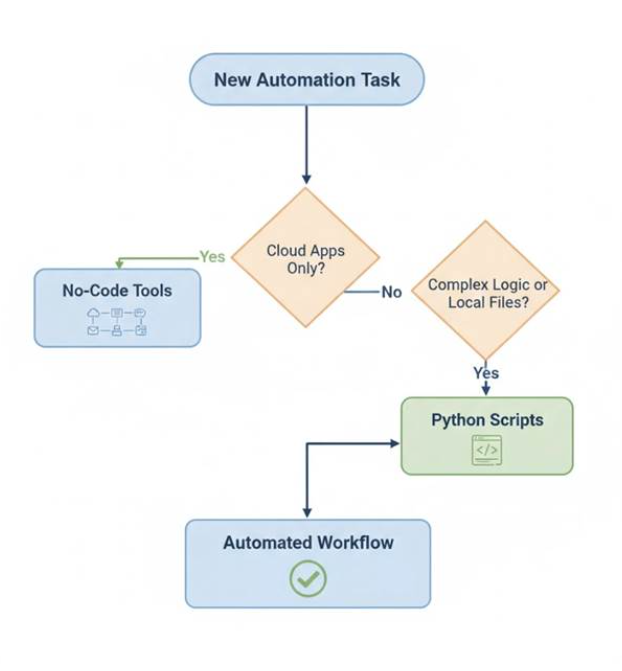
Choose No-Code If:
- You need results today, not next month
- Your automations connect popular cloud apps
- Workflow volume stays under pricing thresholds
- Multiple non-technical team members need access
- You have budget but limited time for learning
Choose Python If:
- You’re willing to invest 2-4 weeks learning
- Local file operations are part of your workflow
- Complex data transformation is required
- You expect automation needs to grow over time
- Long-term cost matters more than immediate speed
- You want skills applicable beyond automation
Consider Both If:
- Quick app integrations need no-code speed
- Complex local tasks need Python flexibility
- Your role involves varied automation challenges
The Hybrid Approach Most Professionals Actually Use
Experienced automation users rarely commit exclusively to either approach. They use no-code tools for quick cloud integrations — connecting CRM to email marketing, syncing calendars across platforms, posting notifications to Slack. These workflows deploy in minutes and run reliably without maintenance.
For everything else — file management, data processing, custom scrapers, complex workflows — they write Python scripts. The investment pays dividends across dozens of use cases rather than accumulating as monthly subscriptions.
This hybrid approach maximizes efficiency: right tool for each job, minimal ongoing costs, maximum flexibility.
Getting Started with Python Automation
If Python fits your needs, the learning path is more accessible than most people expect. Modern resources assume no programming background and focus on practical automation rather than abstract computer science concepts.
The key is starting with problems you actually face. File organization, report generation, email automation — these concrete goals provide motivation through the initial learning curve. Abstract exercises without practical application rarely sustain interest.
For structured guidance designed specifically for working professionals, the complete Python automation guide walks through fundamentals with real-world examples and explains every concept without assuming prior technical knowledge.
Common Objections Addressed
“I don’t have time to learn Python.”
The question is whether you have time not to. Hours spent on manual tasks accumulate faster than learning hours. A 20-hour investment recovers itself within weeks if you’re currently losing 5+ hours weekly to automatable work.
“No-code is improving rapidly — won’t it eventually match Python?”
Capabilities are expanding, but the fundamental constraint remains: visual builders sacrifice flexibility for simplicity. Complex logic, local operations, and custom processing will always favor code-based approaches. The gap may narrow but won’t close.
“My company already pays for Zapier/Power Automate.”
Use what’s available for appropriate tasks. But don’t let existing subscriptions limit your thinking. If Python better serves certain workflows, adding those skills expands what you can accomplish rather than replacing existing tools.
Making Your Decision
Both paths lead to less manual work. No-code gets you there faster with higher ongoing costs. Python requires upfront investment but delivers unlimited automation capacity.
For professionals planning to automate multiple workflows over time, building transferable skills that grow in value, Python typically delivers superior long-term returns. For those needing quick wins on cloud-based integrations without learning commitment, no-code tools serve perfectly well.
The worst choice is making no choice — continuing manual work while debating which automation approach to pursue. Pick one, start automating, and adjust based on experience. Both options beat the status quo of repetitive tasks consuming hours that could go toward meaningful work.
Ready to explore Python automation? This beginner-friendly guide provides the foundation for professionals without programming backgrounds.
